
How to Claim Your Business on ChatGPT (and What to Fix First)
On November 10, OpenAI opened business profiles in ChatGPT. Any eligible business can now claim a free profile in Business Hub and get a small dashboard of how often ChatGPT mentions it.
If you run a shop, a practice or a service business in Westchester or Fairfield County, you'll hear "claim your ChatGPT profile" a lot this month. Here's how to claim your business on ChatGPT, what you get once you do, and the part most guides skip: what actually decides whether ChatGPT names you when someone in Rye or Westport asks who to call.
I'm working from OpenAI's own help article, policy and terms, linked at the bottom, plus our own claim. Clare Digital is a local agency in Ridgefield, CT, and we claimed our own listing on November 11, so every screenshot below is ours. Where OpenAI doesn't say something, I say that too.
How to claim your business on ChatGPT
The claim is free. Ours took about three minutes of clicking, plus a few minutes waiting for a DNS record to show up, and approval came in seconds. You don't need an ad account. You need to own the business or be authorized to represent it.
Before you start. Use your own ChatGPT login, not a shared company workspace. OpenAI notes that for a business claimed inside a workspace, people you invite later "may need to be members of that workspace." The owner should have a driver's license or passport nearby (the ID check is the owner's to do, not an employee's or an agency's), and know your business name exactly as it appears on your registration.
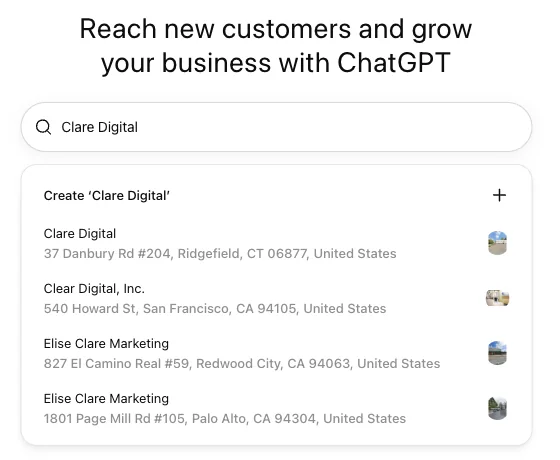
1. Find your business in Business Hub. Open ChatGPT, go to Business Hub, and search for your business. If you run a local store or restaurant, there's a catch: OpenAI says local businesses "can currently claim only an existing U.S. listing." Online businesses may see an option to add a new one. Ours was already there: Business Hub had pulled Clare Digital in from map data, Ridgefield address and all, so we never had to create anything. OpenAI also says claiming is "initially available to eligible businesses with a website," so if you don't have one, that's your first project.
2. Verify you're the business. OpenAI offers some mix of these, depending on your business:
- A code by text or automated call to your business phone
- A code to your business email
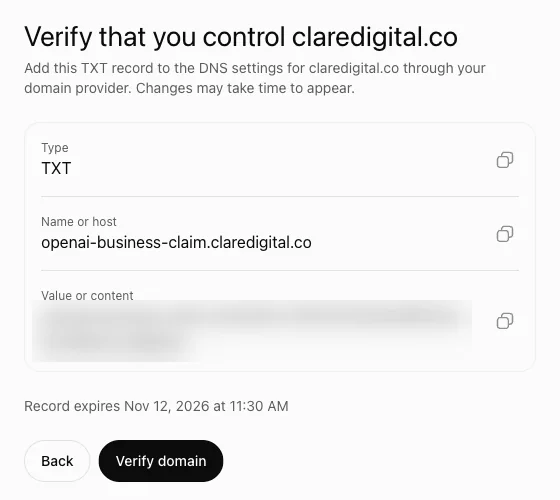
- A TXT record on your website's domain ("Copy the type, name or host, and value exactly. If someone else manages your domain, ask them to add the record for you.")
- Your Shopify store, if you have one
You only see the methods offered for your listing. Pick the one where the phone number or email shown is actually yours. We were offered one method, the website domain, and it came down to a single TXT record at our DNS provider.
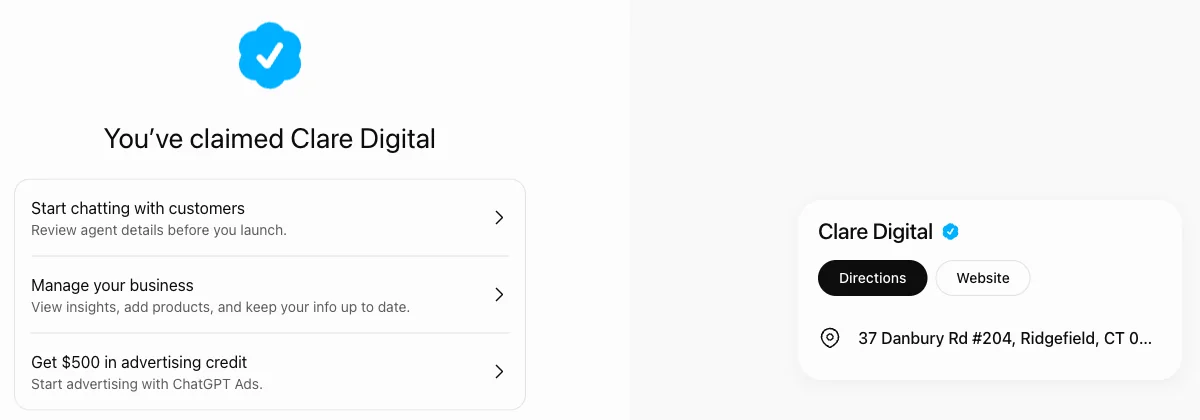
3. Wait for the decision. OpenAI reviews the claim and emails you. It doesn't publish a review time. Ours was approved within seconds of the DNS record showing up: a "You've claimed Clare Digital" screen, a blue verified badge on the listing, and the dashboard right after.
4. The owner verifies their identity with Persona. Before you can edit your business info, upload products or publish a business agent, OpenAI requires identity verification through Persona. Expect the owner's government ID, and possibly business registration information and proof you're authorized. You can claim and see the dashboard without it: on our claim, the ID step only came up once we tried to edit info or add products.
One thing to know: if you're creating a new profile, OpenAI says its approval "automatically publishes the profile." Fill in your fields before you submit Persona, not after.

5. Fill in the profile. OpenAI lists the editable fields as website, business description, product or service category, logo, delivery policy, return policy and cover photo, "and other optional details." Its policy requires accurate name, category, address or service area, hours, contact details, and products or services. OpenAI reviews every change before it goes live. Until the owner's ID check is done, these fields stay locked, so your listing shows what ChatGPT already had from map data and your website.
What happened when we claimed ours
We claimed Clare Digital on November 11, the day after launch. Here's what actually happened, start to finish:
- The listing already existed. It came from map data, with our Ridgefield address. We claimed it, we didn't create it.
- One DNS record verified it. A single TXT record on claredigital.co. The only real wait was the few minutes it took the record to show up.
- Approval took seconds, with a blue verified badge on the listing.
- OpenAI had already crawled our site. The dashboard's website status showed access confirmed on November 5, six days before we claimed anything.
- Editing info, adding products and publishing the agent all need the owner's government ID. That step belongs to the owner. An agency can't do it for you.
- The agent builder isn't available yet for us. Business Hub says it's rolling out to different types of businesses gradually.
- The insights started empty. Mentions, profile views and website clicks fill in once there are enough mentions.
- There's an ad offer waiting. OpenAI's ads site offers $500 in ad credit when you spend $500, through December 31. Advertising doesn't change ChatGPT's answers, so treat that as a separate decision.
What to write in your ChatGPT profile
Write the description the way a neighbor would explain you. What you do, where, for whom. Name your town and the towns you serve. "Pediatric dentist in Scarsdale, seeing families from Hartsdale, Edgemont and White Plains" beats "Excellence in dental care."
Keep it true and current. The policy bans fabricated reviews, "unsupported guarantees," and claims that hide fees. And it has to match your website, because ChatGPT reads that too. OpenAI says it "may supplement, edit, or replace information using other sources," and that claiming "does not give you exclusive control."
What the ChatGPT dashboard shows, and what it hides
Once you're verified, Business Hub shows you the last 7 or 28 days of:
- Mentions: how often ChatGPT referenced you. For an online business, OpenAI counts a mention only when ChatGPT references your website, not just your name.
- Profile views: how often people opened your profile in ChatGPT.
- Website clicks from ChatGPT.
- Discovery topics: the themes people were asking about when you came up.
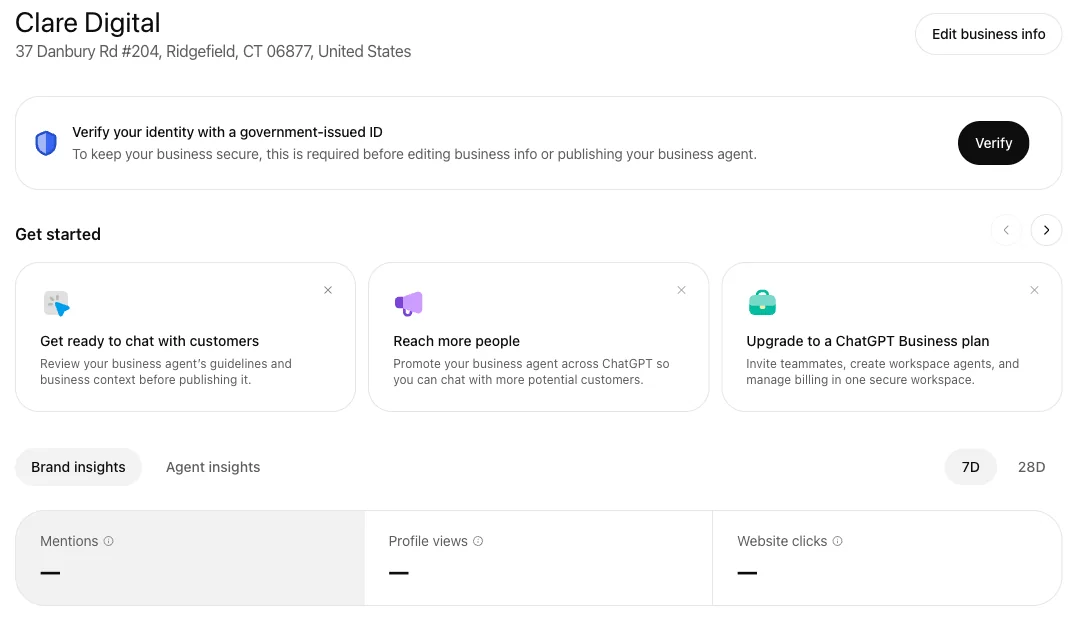
What it doesn't show is the part you'd most want to know. OpenAI says no individual prompts are shown. You won't see the exact questions people typed, the competitors ChatGPT recommended instead of you, or which of those chats turned into a phone call.
That's fine for a start. It just means the dashboard tells you whether you're showing up, not why, and not who is winning the answer when you aren't.
What local AI answers actually cite
Here's the part that matters most for a local business: claiming doesn't raise your visibility. OpenAI says so in its help article. Advertising with OpenAI doesn't influence ChatGPT's answers either.
So what does? This month we checked 8 local businesses in Westchester and Fairfield, 8 customer questions each, in ChatGPT and in Google's AI Mode. In those 64 answers per engine:
- Google Business Profile. Google's AI cited Google Business Profiles 58 times out of 64. And your customers still use Google's AI Mode and AI Overviews alongside ChatGPT.
- Your own website. ChatGPT cited the businesses' own websites 50 times out of 64. A page that plainly says what you do, where you are and which towns you serve gives it something solid to quote. I covered the general version of this in why traditional SEO won't get you cited by AI.
A perfectly written ChatGPT profile on top of a half-finished Google listing and an unclaimed Yelp page won't do much.
What to fix first
If you have an hour this week, do these in order:
- Finish your Google Business Profile. Right category, every service listed, real hours, recent photos, a description that names your town.
- Claim and clean up Yelp. Same name, address and phone as Google. Answer recent reviews.
- Claim your ChatGPT profile and write it the way a neighbor would describe you.
- Fix your website's location page. Your town in the headline, your services in plain words, an FAQ that answers what customers actually ask. The steps in how to optimize content for AI search apply to a local site too.
- Ask for reviews on purpose. A counter card with a QR code and a short text after each visit will out-work any profile tweak.
Then ask ChatGPT yourself. Type the question your customer would: "best plumber near Darien," "who does kitchen remodels in New Canaan." See who gets named and what sources it cites. That list is your to-do list.
If you want an agency to help
You can do all of this yourself. If you hire someone, keep the claim under your own login. OpenAI says the admin who claimed the business "can add teammates in Business Hub and grant an agency access to manage the business or its agent," each person on their own ChatGPT account. Don't hand over your password, and don't forward a personal claim invitation. OpenAI says not to.
Two more things OpenAI's docs make clear. There's no agency dashboard: each business is managed separately, one at a time. And by using Business Hub you agree to OpenAI's terms, including a section where you agree not to sue OpenAI over content on your own websites (Section 10.1). Read it before you click through. It's your business agreeing, not your agency.
Q: Is it free to claim your business on ChatGPT?
Yes. Claiming a profile in Business Hub is free and doesn't require an ad account. You need to own the business or be authorized to represent it. To edit the profile, the owner verifies their identity with Persona.
Q: Can a local business without a website claim a ChatGPT profile?
Probably not yet. OpenAI says claiming is initially available to eligible businesses with a website, and local stores and restaurants can currently claim only an existing U.S. listing.
Q: Does claiming my ChatGPT profile help me show up more?
Not by itself. OpenAI says claiming doesn't raise visibility. For local questions, your Google Business Profile, your Yelp page, your reviews and your website do most of the work.
Q: Can I see which questions people asked ChatGPT about my business?
No. The dashboard shows the last 7 or 28 days of mentions, profile views, website clicks and discovery topics. OpenAI says no individual prompts are shown, and it doesn't show which competitors were recommended instead.
Sources
- OpenAI Help: Setting up your business on ChatGPT
- OpenAI: Introducing Businesses in ChatGPT
- OpenAI: Businesses in ChatGPT policy and terms
Want to see what ChatGPT says about your business?
Tell me your business and your town. I'll ask ChatGPT and Google's AI the questions your customers ask, then send you who got named, what the answers trusted, and the three things I'd fix first. Free, within 2 business days, for Westchester and Fairfield businesses.
Rather have it done for you? See the setup or book a call with Clare Digital.